Quando a falha ocorre?
Ao executar o Gerenciamento de Cópia de Arquivos ocorre o seguinte erro:
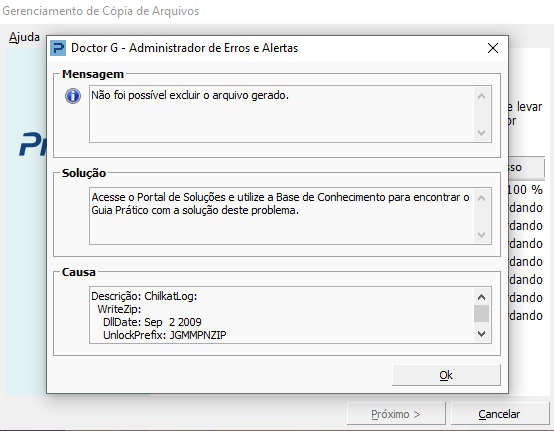
Este erro se dá devido ao serviço do banco de dados SQL que, quando está em execução, não permite copia das pastas ANF.
Abaixo, a descrição completa do erro:
Descrição: ChilkatLog:
WriteZip:
DllDate: Sep 2 2009
UnlockPrefix: JGMMPNZIP
Username: Administrador
Component: ActiveX
tempFile: .\ckz_KHCD.tmp
Encryption: 0
PasswordProtected: 0
Failed to open file (2)
filename: P:\PROEMP00\ANF\ProANF_PPROEMP00.mdf
currentWorkingDirectory: C:\Users\Administrador\Desktop\BACKUP
osErrorInfo: O arquivo já está sendo usado por outro processo.
WindowsError: 0x20
loadFileInfoAnsi failed: cannot open for reading
filename: P:\PROEMP00\ANF\ProANF_PPROEMP00.mdf
curDir: C:\Users\Administrador\Desktop\BACKUP
Failed to obtain file information
filename: PROEMP00/ANF/ProANF_PPROEMP00.mdf
FailedFile: PROEMP00\ANF\ProANF_PPROEMP00.mdf
Failed to open file (2)
filename: P:\PROEMP00\ANF\ProANF_PPROEMP00_32350746000111_0005.mdf
currentWorkingDirectory: C:\Users\Administrador\Desktop\BACKUP
osErrorInfo: O arquivo já está sendo usado por outro processo.
WindowsError: 0x20
loadFileInfoAnsi failed: cannot open for reading
filename: P:\PROEMP00\ANF\ProANF_PPROEMP00_32350746000111_0005.mdf
curDir: C:\Users\Administrador\Desktop\BACKUP
Failed to obtain file information
filename: PROEMP00/ANF/ProANF_PPROEMP00_32350746000111_0005.mdf
FailedFile: PROEMP00\ANF\ProANF_PPROEMP00_32350746000111_0005.mdf
Failed to open file (2)
filename: P:\PROEMP00\ANF\ProANF_PPROEMP00_32350746000111_0005_log.ldf
currentWorkingDirectory: C:\Users\Administrador\Desktop\BACKUP
osErrorInfo: O arquivo já está sendo usado por outro processo.
WindowsError: 0x20
loadFileInfoAnsi failed: cannot open for reading
filename: P:\PROEMP00\ANF\ProANF_PPROEMP00_32350746000111_0005_log.ldf
curDir: C:\Users\Administrador\Desktop\BACKUP
Failed to obtain file information
filename: PROEMP00/ANF/ProANF_PPROEMP00_32350746000111_0005_log.ldf
FailedFile: PROEMP00\ANF\ProANF_PPROEMP00_32350746000111_0005_log.ldf
Failed to open file (2)
filename: P:\PROEMP00\ANF\ProANF_PPROEMP00_log.ldf
currentWorkingDirectory: C:\Users\Administrador\Desktop\BACKUP
osErrorInfo: O arquivo já está sendo usado por outro processo.
WindowsError: 0x20
loadFileInfoAnsi failed: cannot open for reading
filename: P:\PROEMP00\ANF\ProANF_PPROEMP00_log.ldf
curDir: C:\Users\Administrador\Desktop\BACKUP
Failed to obtain file information
filename: PROEMP00/ANF/ProANF_PPROEMP00_log.ldf
FailedFile: PROEMP00\ANF\ProANF_PPROEMP00_log.ldf
CentralDirOffset: 3059243016
NumCentralDirRecords: 43860
EndOfDirectoryOffset: 3063237917
zipFilename: C:\Users\Administrador\Desktop\BACKUP\CopiaSeguranca20201207151538.zip
ZipStructure:
FirstSignature: 0x4034b50
FirstSigAddr: 0
NumFileHeaders: 43860
CentralDirAddr: 3059243016
NumCentralDirRecords: 43860
CentralDirSize: 3994901
PeekSig1: 0x6054b50
NumEntries: 43860
Failed.
Referência/Erro: 61400014
Como corrigir a falha?
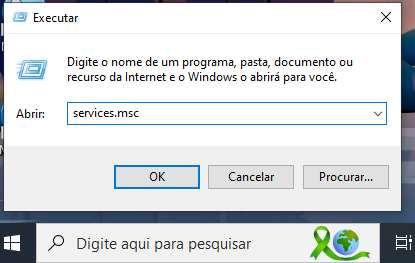
1 - No teclado, pressione "Janela do Windows + R". Digite services.msc
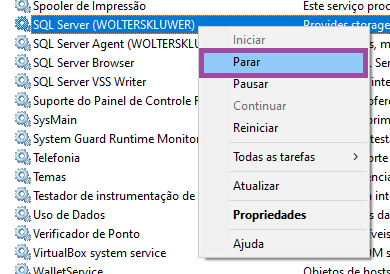
2 - Selecione o serviço do SQL Server e clique com o botão direito do mouse sobre o mesmo.
3 - Selecione a ação de Parar o serviço.